Aplicaciones de Múltiples Páginas (MPA)
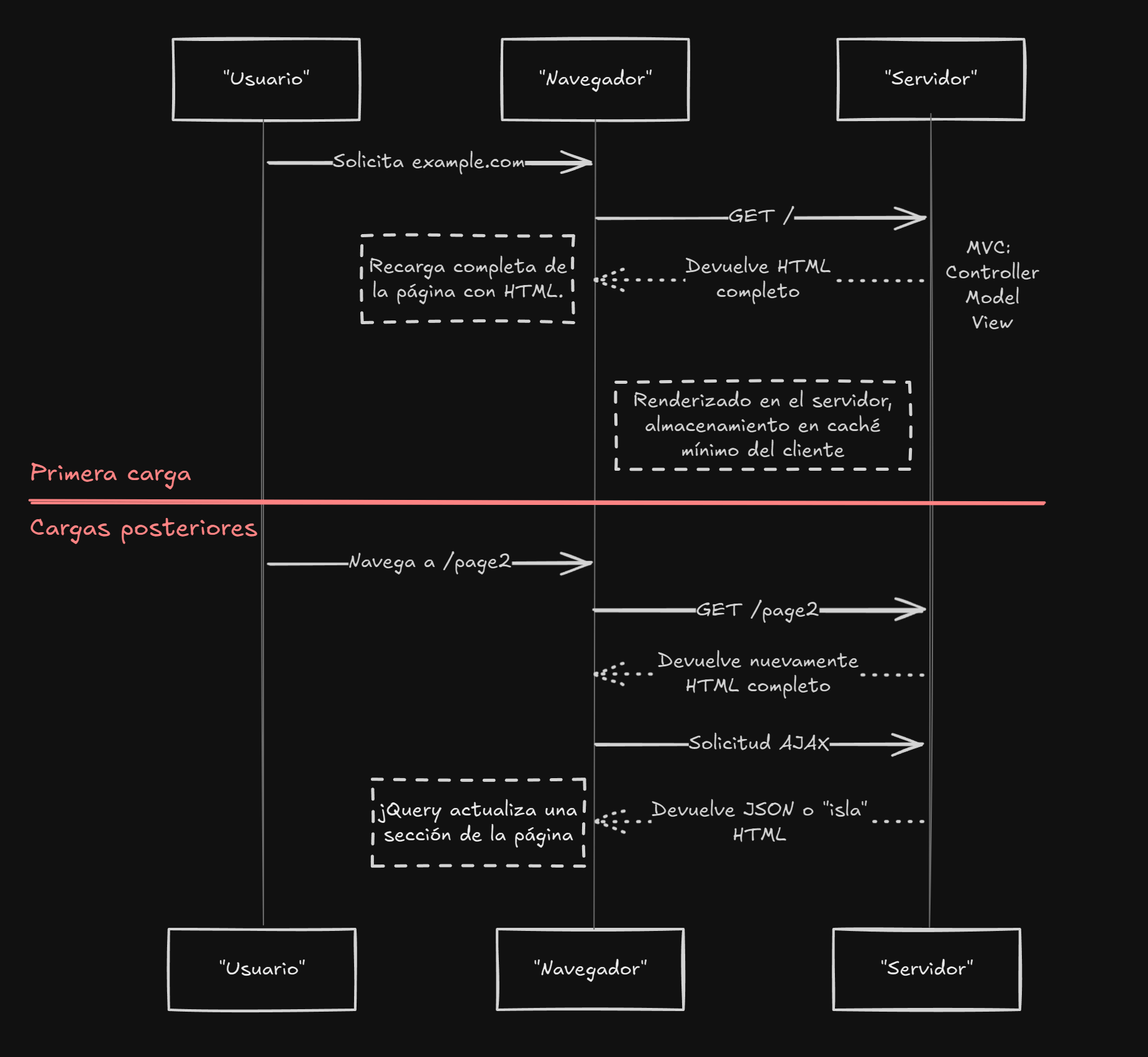
Las MPA recargan la página en cada navegación.
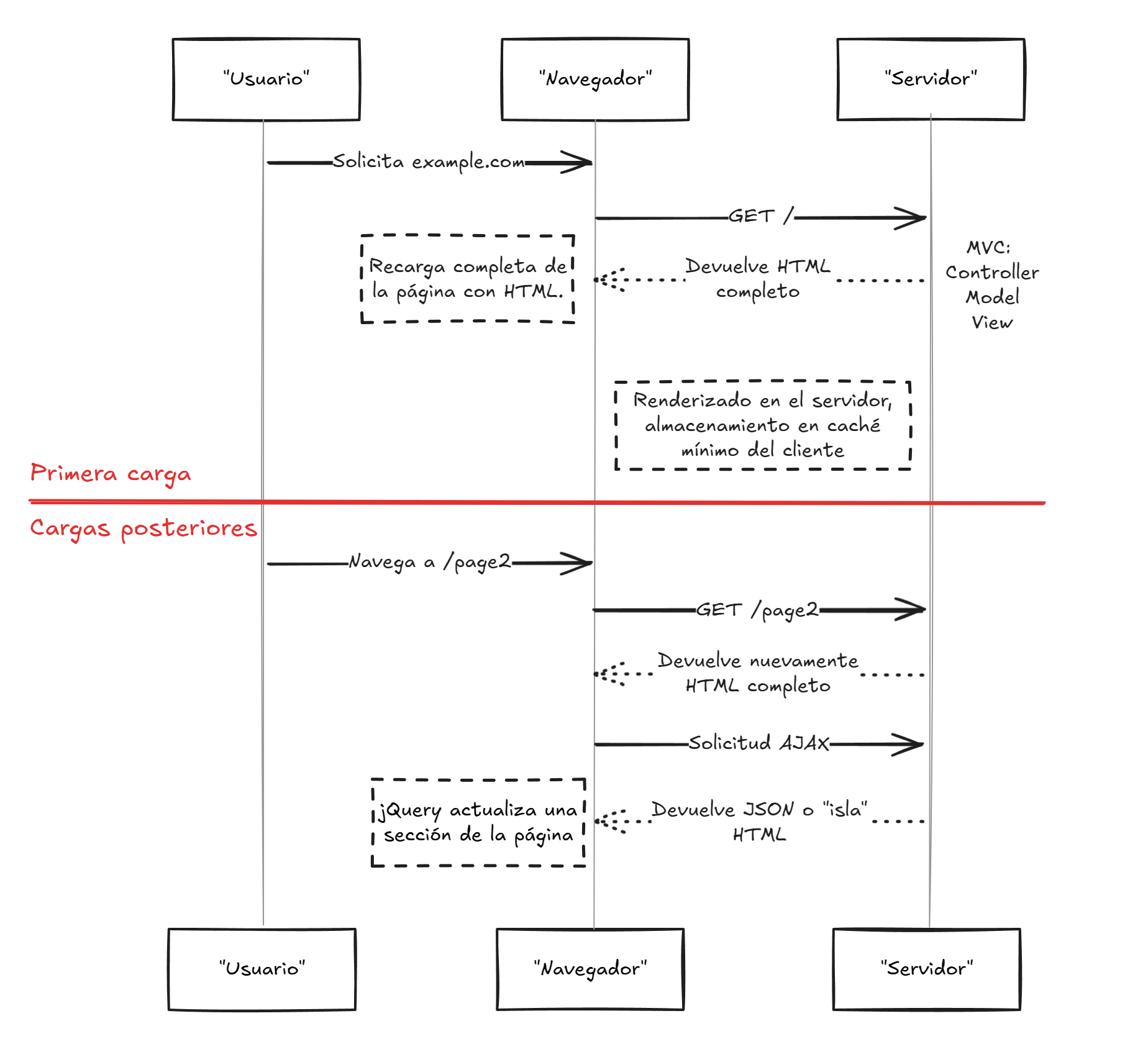
Pros:
Arquitectura simple.
Se entrega HTML completo en la primera carga.
Cuando las páginas son mayormente estáticas, pueden ser almacenadas en caché y entregadas eficazmente por una CDN.
Contras:
La navegación es más lenta debido a recargas completas de la página.
Las actualizaciones dinámicas requieren recargas completas de la página.
Aplicaciones de Página Única (SPA)
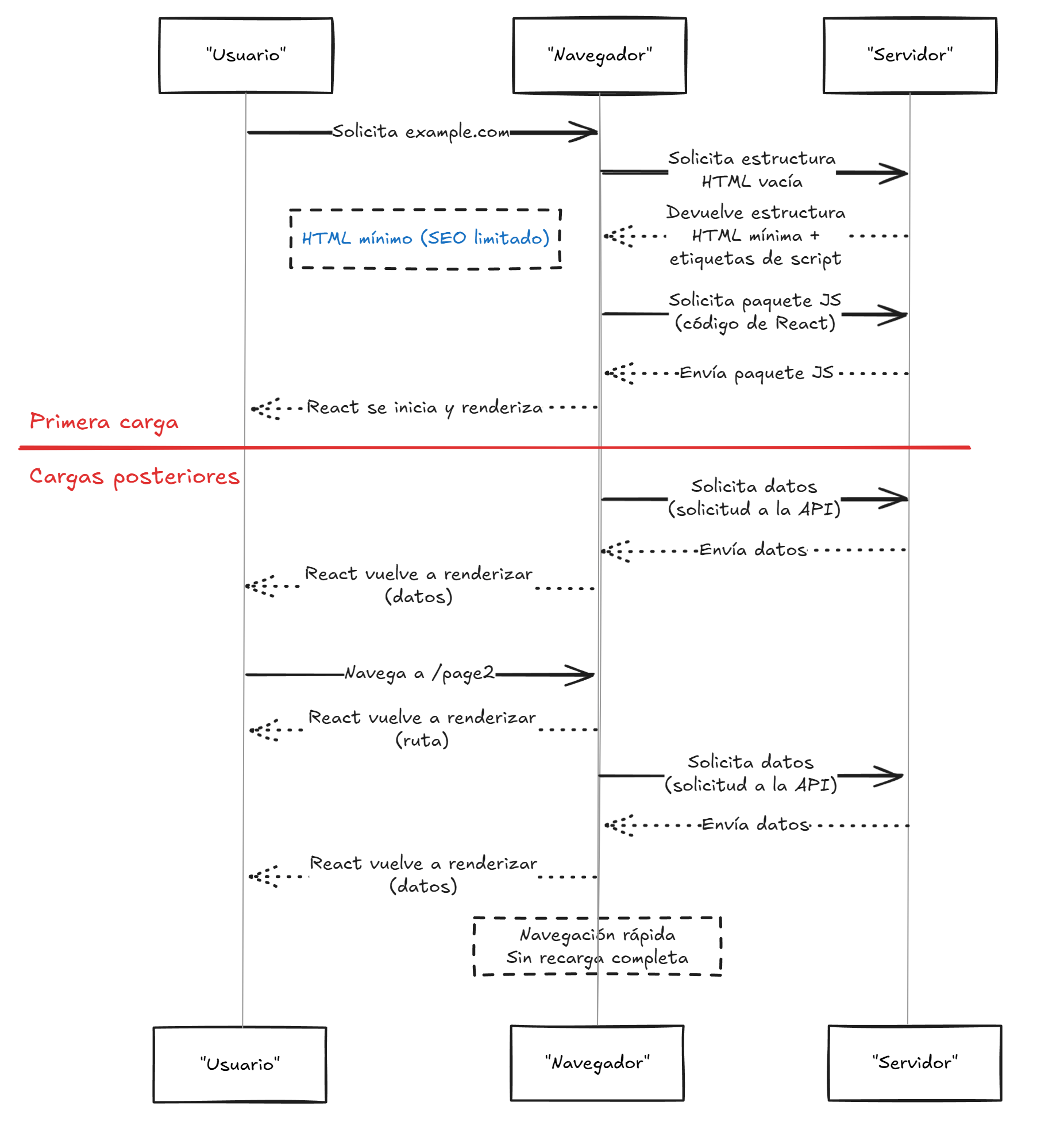
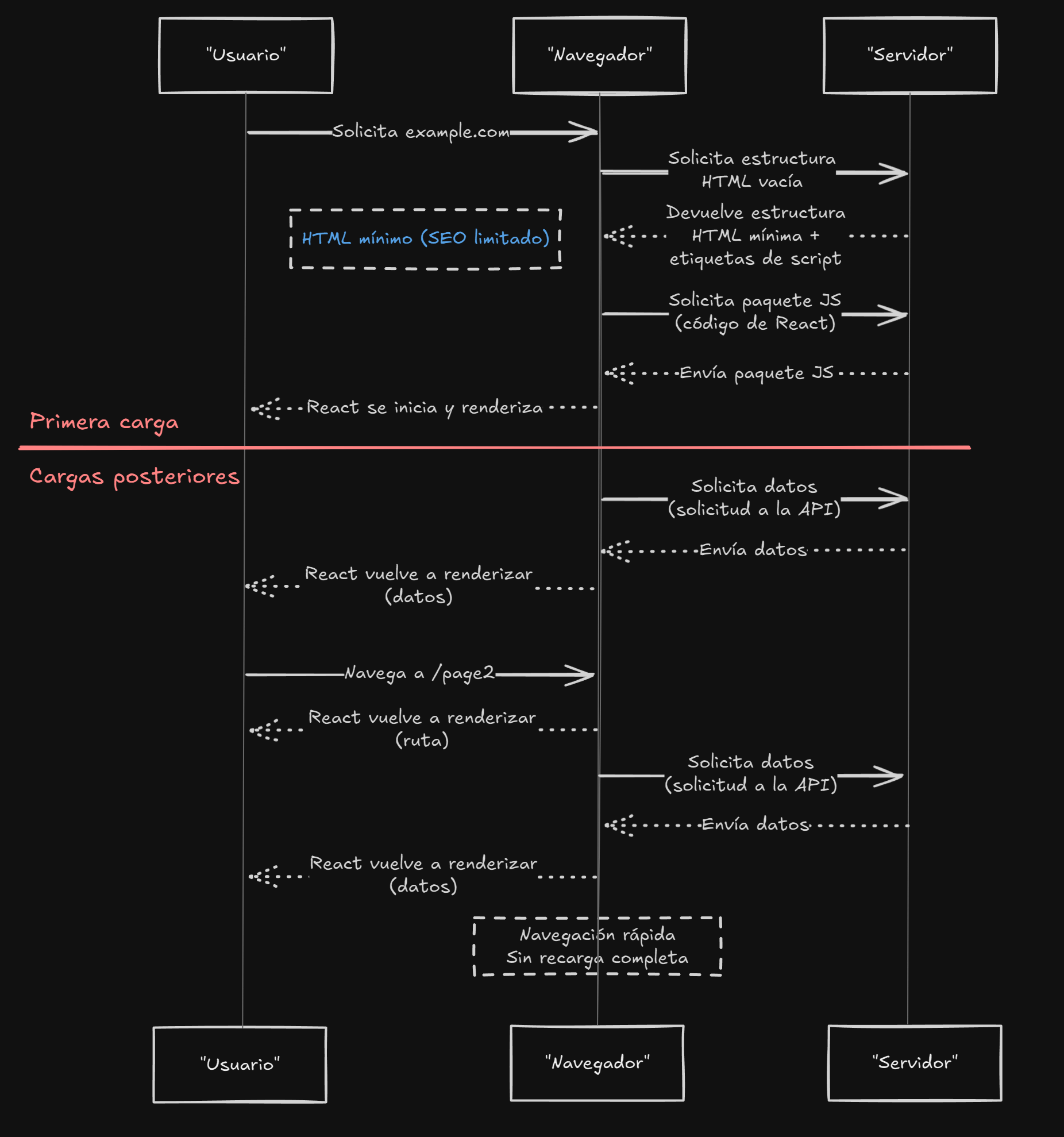
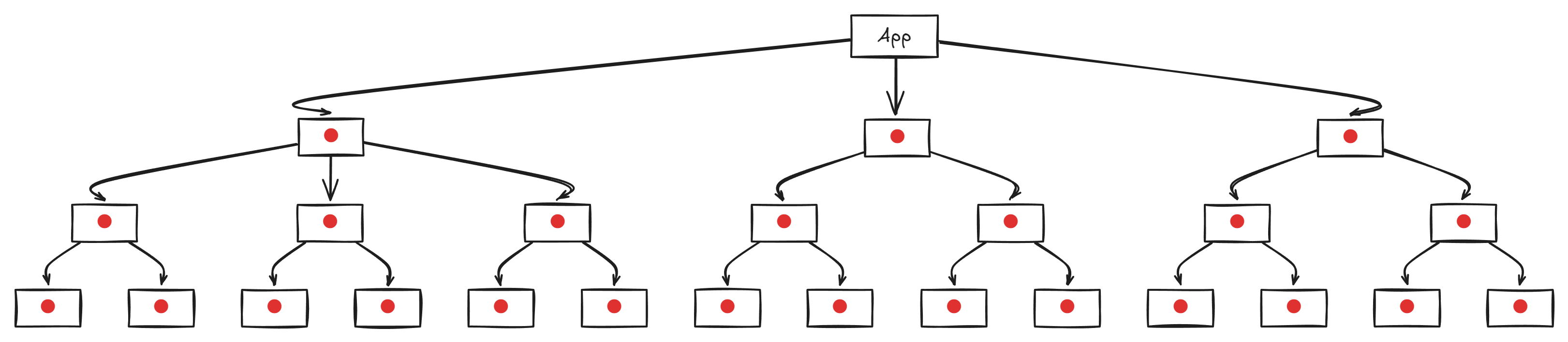
Las SPA cargan contenido de forma dinámica en el cliente. Esto significa que el HTML inicial es esencialmente vacío.
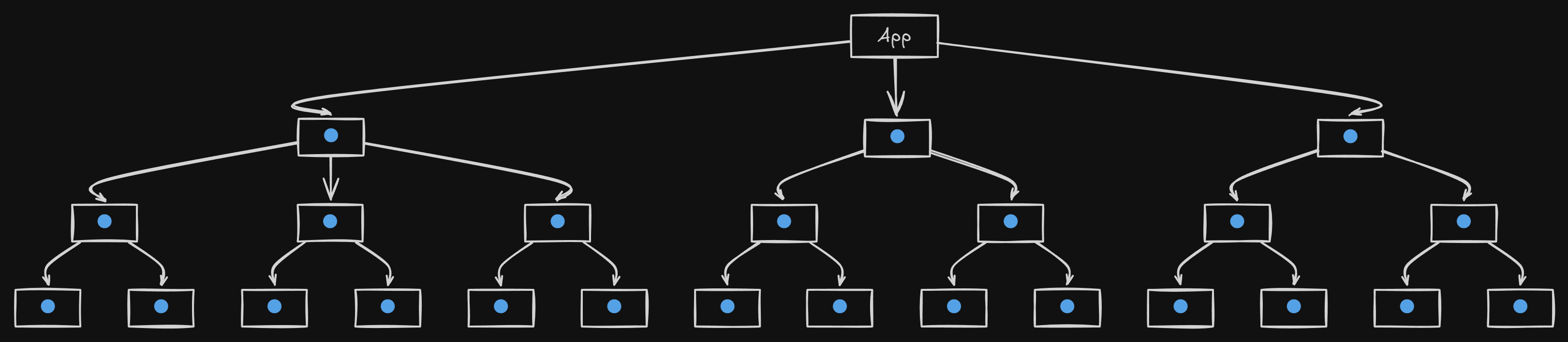
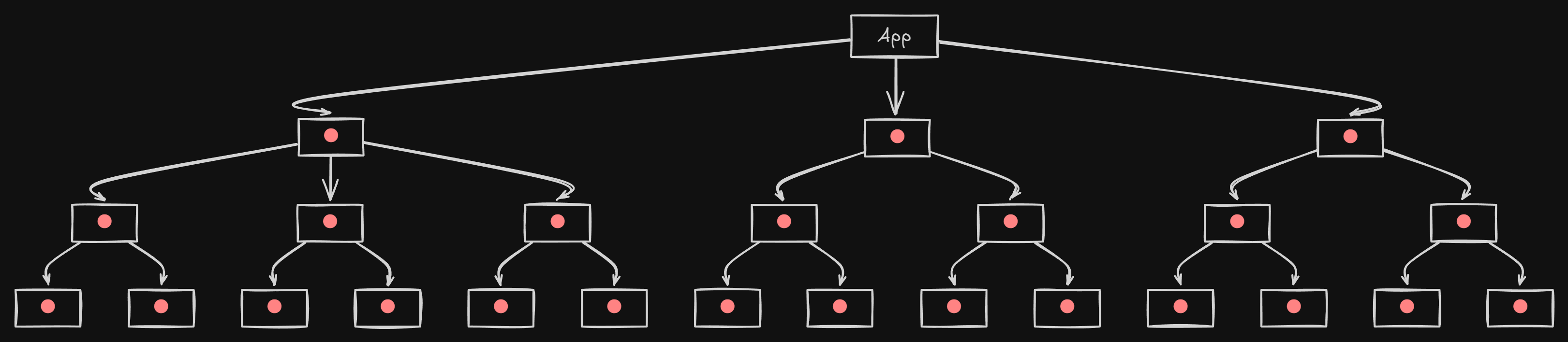
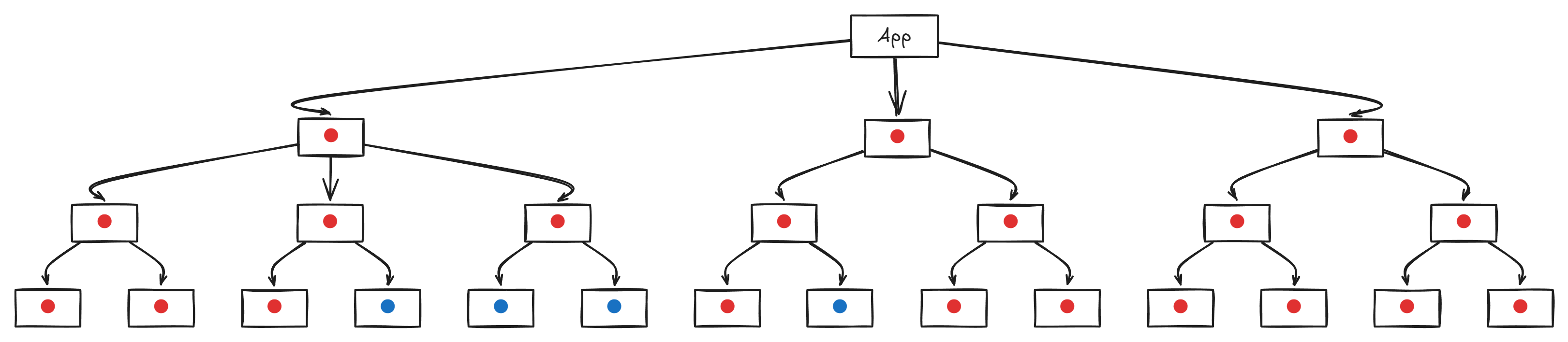
Diagrama
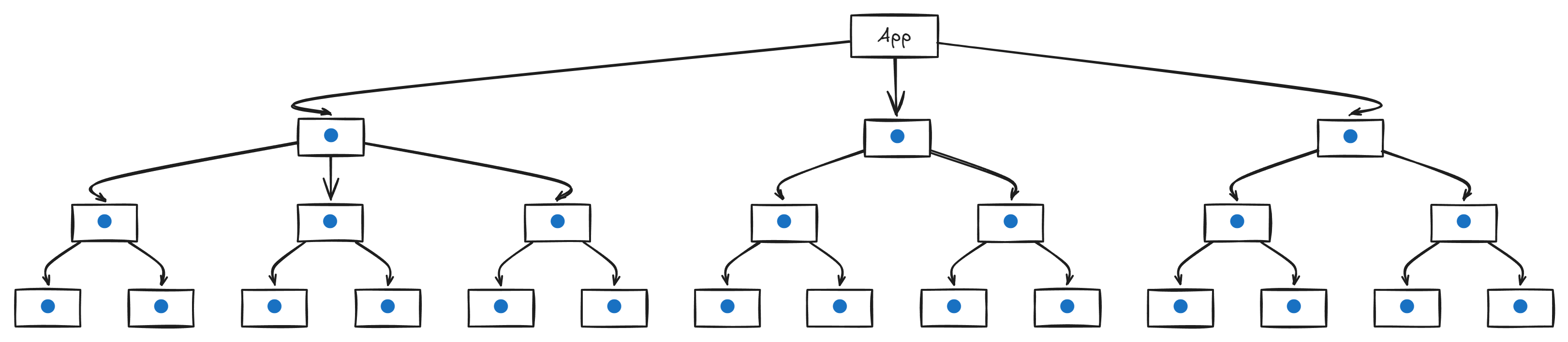
Diagrama de React
Código
tutorial-code.jsx
actual-code.jsx
react-query.jsx
function App () {
const [ data , setData ] = React . useState ( null );
const [ query , setQuery ] = React . useState ( "default" );
const [ input , setInput ] = React . useState ( "default" );
const [ loading , setLoading ] = React . useState ( true );
React . useEffect (() => {
setLoading ( true );
fetch (
`https://api.example.com/data?query= ${ encodeURIComponent ( query ) } `
)
. then (( response ) => response . json ())
. then (( result ) => {
setData ( result );
setLoading ( false );
})
. catch (( error ) => {
console . error ( error );
setLoading ( false );
});
}, [ query ]);
const handleSubmit = ( e ) => {
e . preventDefault ();
setQuery ( input );
};
return (
< div >
< h1 > Data Fetch Tutorial </ h1 >
< form onSubmit = { handleSubmit } >
< input
value = { input }
onChange = { ( e ) => setInput ( e . target . value ) }
placeholder = "Enter query"
/>
< button type = "submit" > Search </ button >
</ form >
{ loading ? (
< p > Loading data... </ p >
) : (
< pre > { JSON . stringify ( data , null , 2 ) } </ pre >
) }
</ div >
);
}
const DataContext = React . createContext ();
function DataProvider ({ children }) {
const [ data , setData ] = React . useState ( null );
const [ loading , setLoading ] = React . useState ( false );
const [ error , setError ] = React . useState ( null );
const [ query , setQuery ] = React . useState ( "default" );
React . useEffect (() => {
const controller = new AbortController ();
const signal = controller . signal ;
async function fetchData () {
setLoading ( true );
setError ( null );
try {
const response = await fetch (
`https://api.example.com/data?query= ${ encodeURIComponent ( query ) } ` ,
{ signal }
);
if ( ! response . ok ) throw new Error ( "Network response was not ok" );
const result = await response . json ();
const processedData = result . map (( item ) => ({
... item ,
processed: true ,
}));
setData ( processedData );
} catch ( err ) {
if ( err . name !== "AbortError" ) setError ( err );
} finally {
setLoading ( false );
}
}
fetchData ();
return () => controller . abort ();
}, [ query ]);
return (
< DataContext.Provider value = { { data , loading , error , query , setQuery } } >
{ children }
</ DataContext.Provider >
);
}
function DisplayData () {
const { data , loading , error , query , setQuery } = React . useContext (
DataContext
);
const [ input , setInput ] = React . useState ( query );
const handleSubmit = ( e ) => {
e . preventDefault ();
setQuery ( input );
};
return (
< div >
< form onSubmit = { handleSubmit } >
< input
value = { input }
onChange = { ( e ) => setInput ( e . target . value ) }
placeholder = "Enter query"
/>
< button type = "submit" > Search </ button >
</ form >
{ loading && < p > Loading data... </ p > }
{ error && < p > Error: { error . message } </ p > }
{ data && < pre > { JSON . stringify ( data , null , 2 ) } </ pre > }
</ div >
);
}
function App () {
return (
< DataProvider >
< h1 > Advanced SPA Data Fetching Example </ h1 >
< DisplayData />
</ DataProvider >
);
}
function DataComponent ({ query }) {
const { data , isLoading , error } = useQuery (
[ "fetchData" , query ],
() =>
fetch (
`https://api.example.com/data?query= ${ encodeURIComponent ( query ) } `
). then (( res ) => res . json ())
);
if ( isLoading ) return < p > Loading with React Query... </ p > ;
if ( error ) return < p > Error loading data </ p > ;
return < pre > { JSON . stringify ( data , null , 2 ) } </ pre > ;
}
function App () {
const [ query , setQuery ] = React . useState ( "default" );
const [ input , setInput ] = React . useState ( "default" );
const handleSubmit = ( e ) => {
e . preventDefault ();
setQuery ( input );
};
return (
< div >
< h1 > SPA using React Query </ h1 >
< form onSubmit = { handleSubmit } >
< input
value = { input }
onChange = { ( e ) => setInput ( e . target . value ) }
placeholder = "Enter query"
/>
< button type = "submit" > Search </ button >
</ form >
< DataComponent query = { query } />
</ div >
);
}
Pros:
Navegación rápida dentro de la página.
Interactividad dinámica.
Contras:
HTML inicial mínimo.
Fuerte dependencia del JavaScript del lado del cliente.
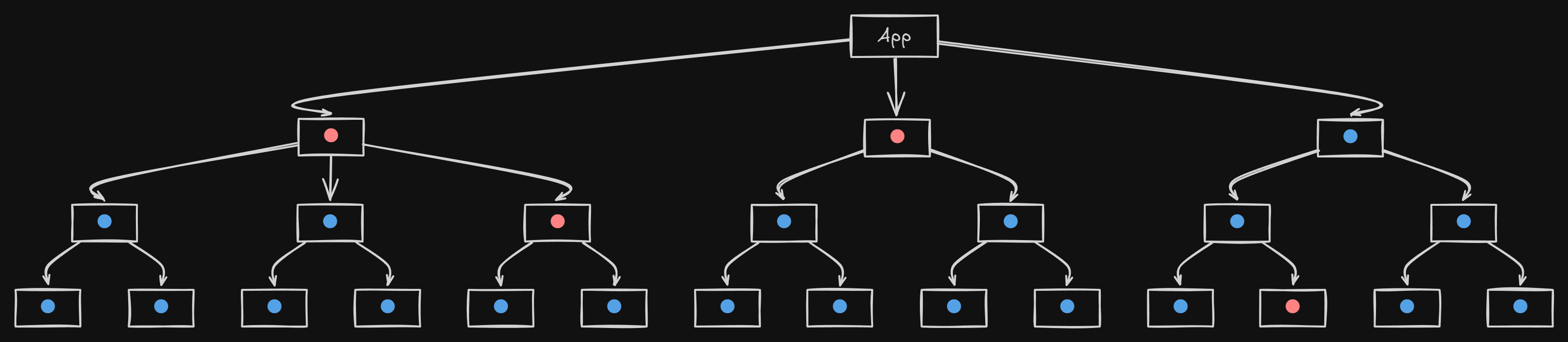
SPA-influenciado Isomórfico
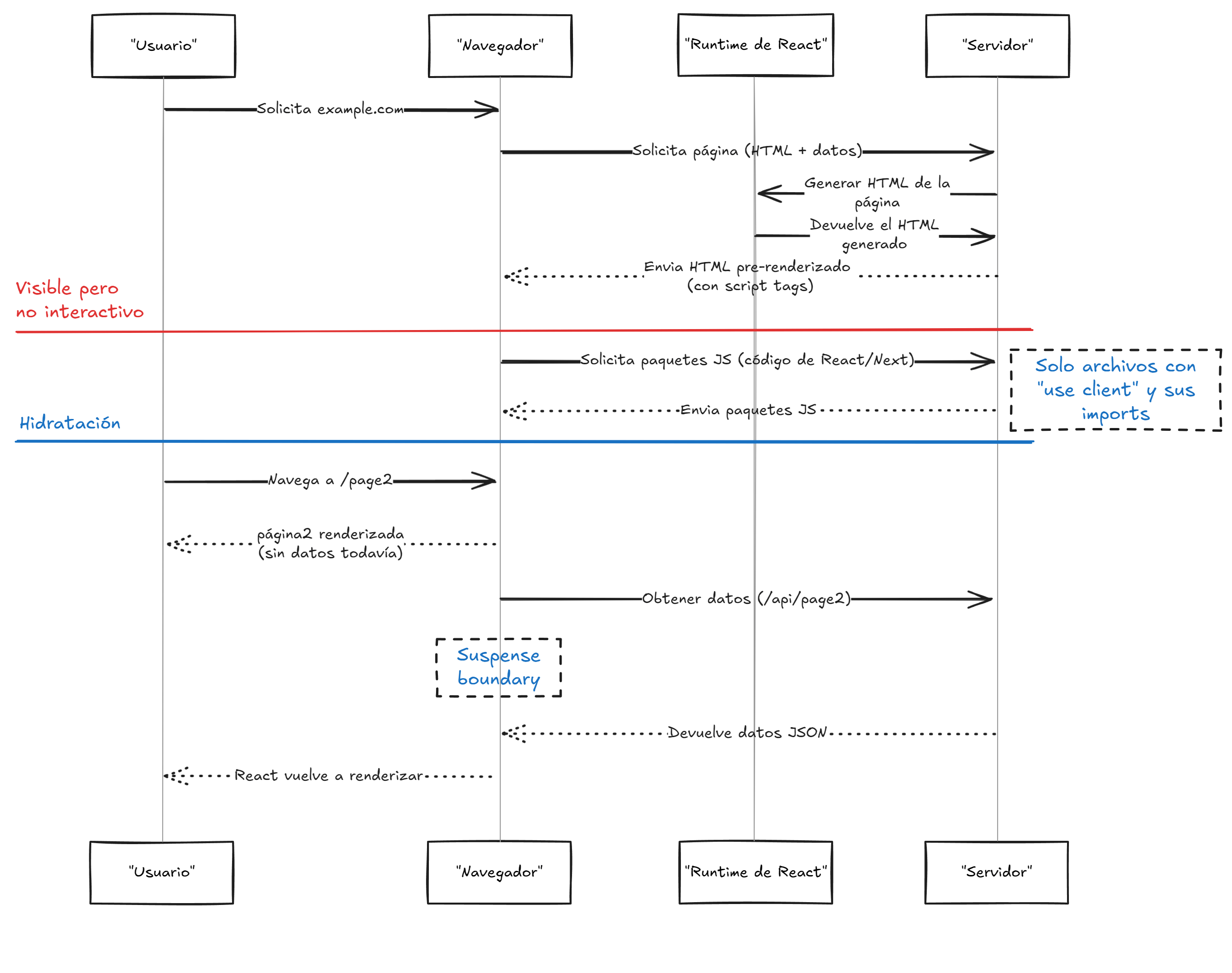
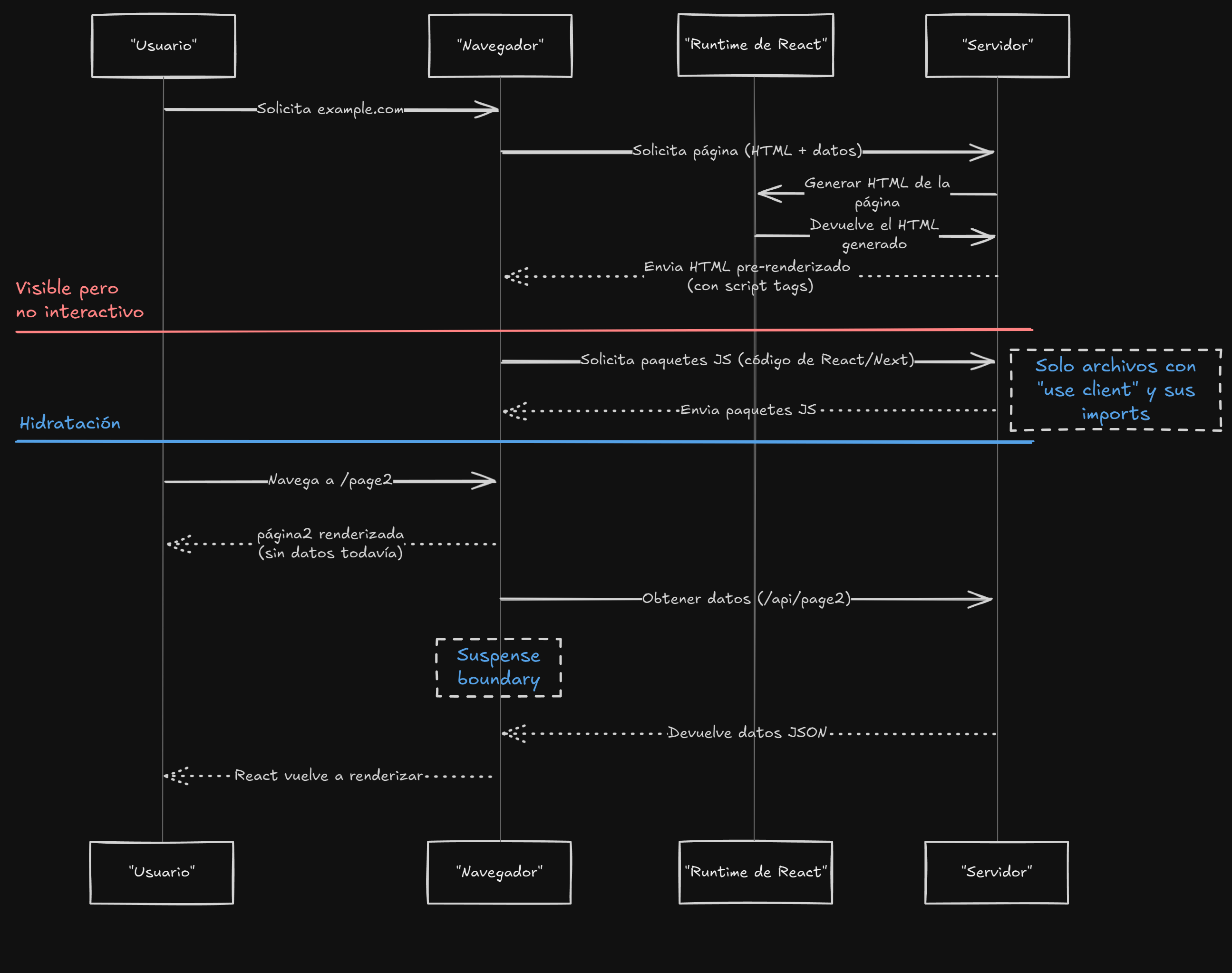
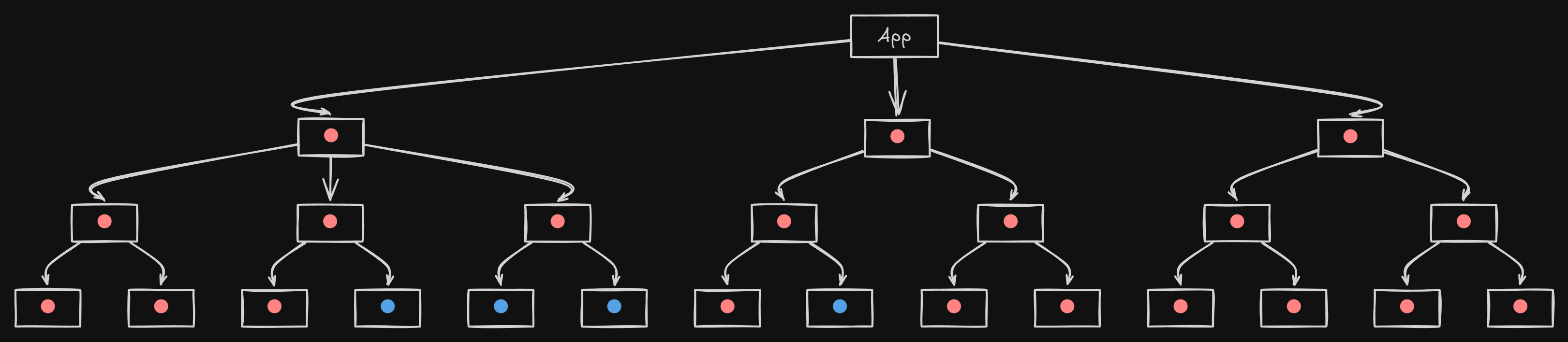
El HTML inicial se renderiza en el servidor para SEO y una primera carga rápida, luego se hidrata en el cliente para habilitar la interactividad.
Diagrama
Diagrama de React
Código
page.jsx
loading.jsx
error.jsx
MutationManager.jsx
export const metadata = {
title: "SPA-influenciado Isomorphic Rendering Example" ,
description: "An isomorphic rendering example with SEO metadata." ,
keywords: "rendering, isomorphic, react, SEO, server components" ,
};
// Assume MutationManager is dynamically imported for client-side behavior.
export default async function Page ({ searchParams }) {
const query = searchParams . query || "default" ;
const res = await fetch (
`https://api.example.com/data?query= ${ encodeURIComponent ( query ) } ` ,
{ cache: "force-cache" }
);
const data = await res . json ();
return (
< div >
< h1 > Isomorphic Page - Results for: { query } </ h1 >
< pre > { JSON . stringify ( data , null , 2 ) } </ pre >
< MutationManager />
</ div >
);
}
export default function Loading () {
return < p > Loading... </ p > ;
}
"use client" ;
export default function Error ({ error , reset }) {
return (
< div >
< h1 > Error Loading Page </ h1 >
< p > { error . message } </ p >
< button onClick = { reset } > Try again </ button >
</ div >
);
}
"use client" ;
import { useState } from "react" ;
import { useMutation , useQueryClient } from "react-query" ;
async function updateData ( newValue ) {
const res = await fetch ( "/api/update" , {
method: "POST" ,
headers: { "Content-Type" : "application/json" },
body: JSON . stringify ({ value: newValue }),
});
if ( ! res . ok ) throw new Error ( "Update failed" );
return res . json ();
}
export default function MutationManager () {
const [ input , setInput ] = useState ( "" );
const queryClient = useQueryClient ();
const mutation = useMutation ( updateData , {
onSuccess : () => queryClient . invalidateQueries ( "fetchData" ),
});
const handleSubmit = ( e ) => {
e . preventDefault ();
mutation . mutate ( input );
};
if ( mutation . error ) {
return (
< div >
< p > Error updating data. </ p >
</ div >
);
}
if ( mutation . isLoading ) {
return (
< div >
< p > Updating... </ p >
</ div >
);
}
return (
< div >
< form onSubmit = { handleSubmit } >
< input
value = { input }
onChange = { ( e ) => setInput ( e . target . value ) }
placeholder = "Enter new value"
/>
< button type = "submit" > Submit </ button >
</ form >
</ div >
);
}
Pros:
Se entrega HTML completo y amigable con SEO inicialmente.
Contras:
Requiere coordinación entre el cliente y el servidor.
Configuración más compleja.
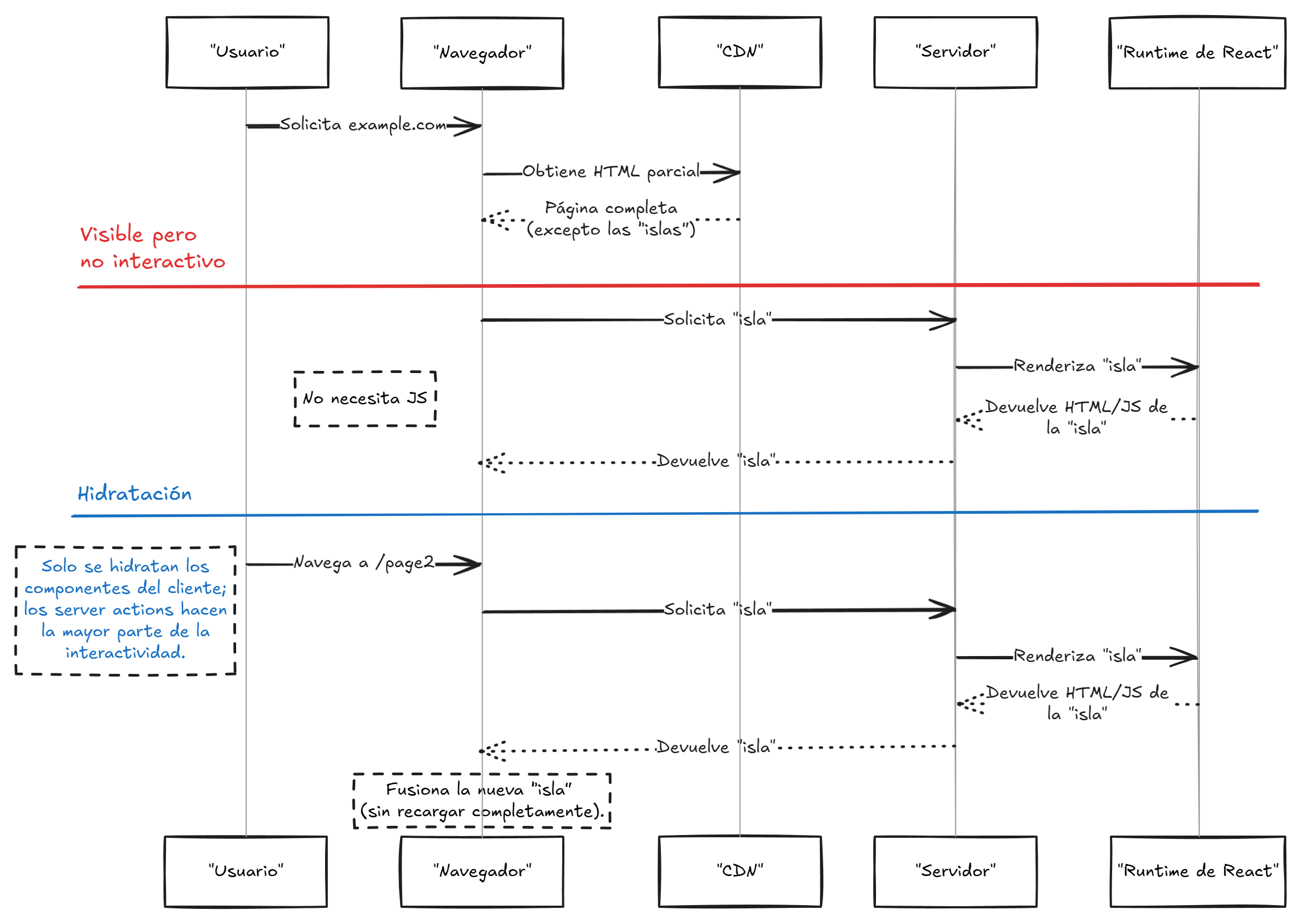
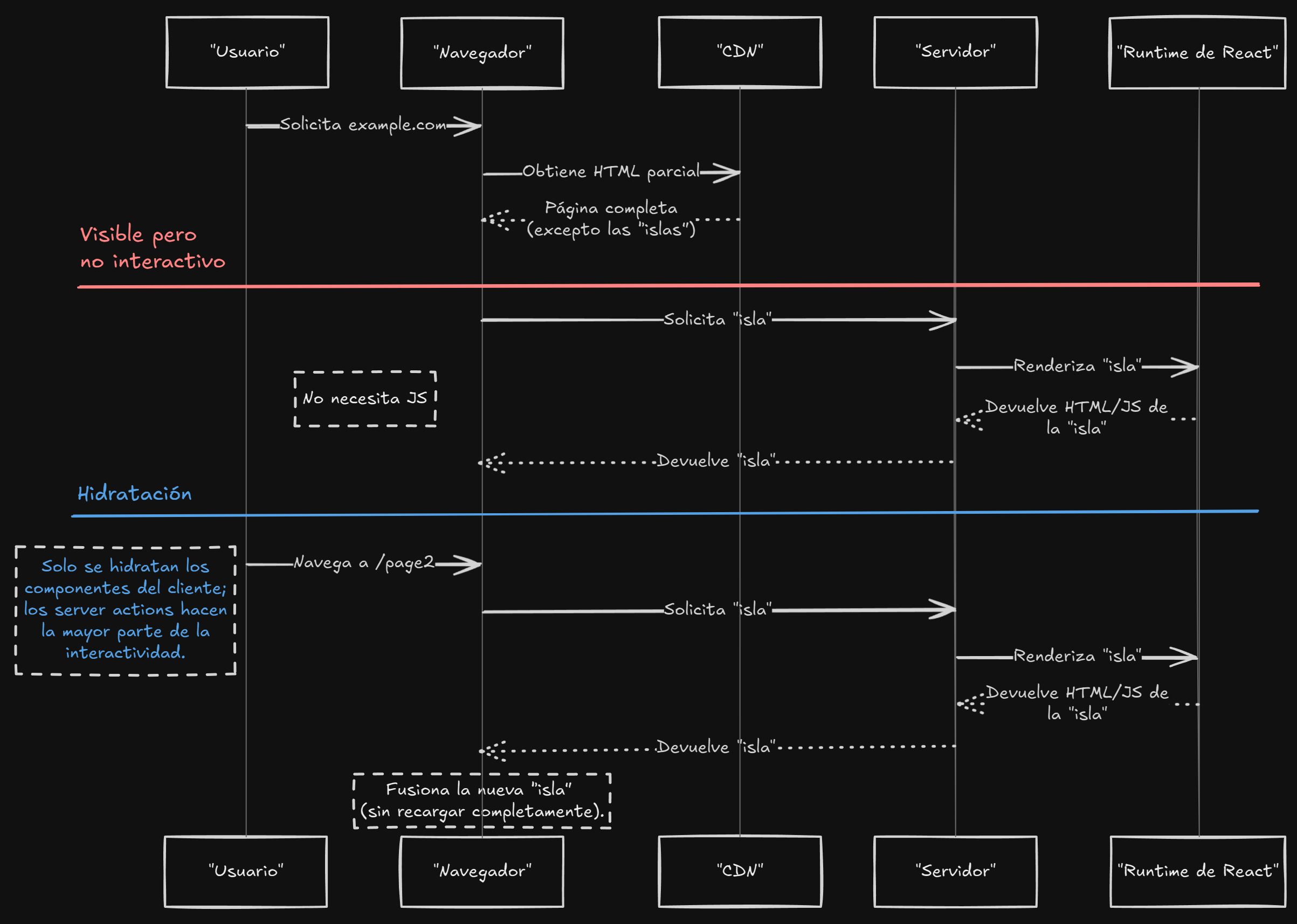
MPA-influenciado por Ejecución Dividida
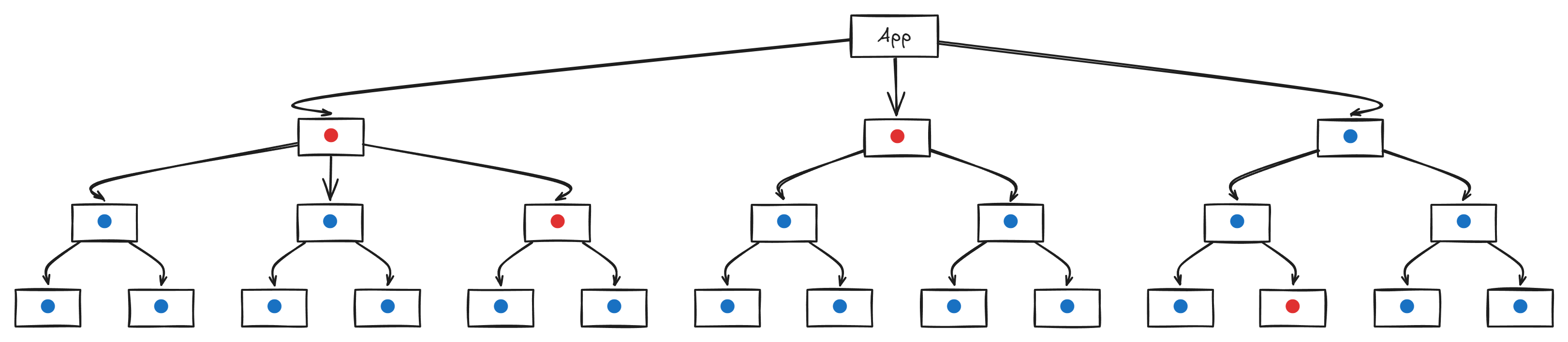
HTML en su mayoría/completo renderizado en el servidor utilizando acciones del servidor.
Diagrama
Diagrama de React
Código
page.jsx
loading.jsx
error.jsx
export const metadata = {
title: "Server-Rendered Page with Actions" ,
description:
"A server-rendered page that handles mutations using server actions and revalidates paths." ,
keywords: "rendering, server actions, Next.js, MPA" ,
};
export default async function Page ({ searchParams }) {
const query = searchParams . query || "default" ;
const res = await fetch (
`https://api.example.com/data?query= ${ encodeURIComponent ( query ) } ` ,
{ cache: "force-cache" }
);
const data = await res . json ();
async function handleMutation ( formData ) {
"use server" ;
const res = await fetch ( "https://api.example.com/update" , {
method: "POST" ,
body: formData ,
});
revalidatePath ( "/" );
}
return (
< div >
< h1 > Server-Rendered Page with Actions </ h1 >
< pre > { JSON . stringify ( data , null , 2 ) } </ pre >
< ErrorBoundary fallback = { < p > Error updating data. </ p > } >
< Suspense fallback = { < p > Updating... </ p > } >
< form action = { handleMutation } >
< input name = "value" type = "text" />
< button type = "submit" > Submit </ button >
</ form >
</ Suspense >
</ ErrorBoundary >
</ div >
);
}
export default function Loading () {
return < p > Loading... </ p > ;
}
"use client" ;
export default function Error ({ error , reset }) {
return (
< div >
< h1 > Error Loading Page </ h1 >
< p > { error . message } </ p >
< button onClick = { reset } > Try again </ button >
</ div >
);
}
Pros:
Entrega de HTML amigable con CDN.
Código mínimo del lado del cliente.
Excelente SEO.
Contras:
La interactividad del lado del cliente puede requerir manejo adicional.
Aumento del consumo de CPU del servidor.
📊 Comparación de Estrategias de Renderizado
Propiedad MPA SPA SPA Isomórfico MPA Ejecución Dividida SEO Amigable ✅ ❌ ✅ ✅ Navegación Rápida ❌ ✅ ✅ ✅ Experiencia Interactiva ❌ ✅ ✅ ✅ Amigable con CDN ✅ ❌ ✅ ✅ Arquitectura Simple ✅ ❌ ❌ ✅ JS Cliente Ligero ✅ ❌ ✅ ✅ Bajo Uso de CPU ❌ ✅ ✅ ❌ Bajos Costos del Servidor ❌ ✅ ❌ ✅
🚀 Ejemplo en Vivo: NextFaster
Para ver estas estrategias de renderizado en acción, consulta NextFaster — un proyecto del mundo real que combina componentes del servidor, islas de React y ejecución dividida para un rendimiento y SEO óptimos.
¿Qué hace a NextFaster interesante?
⚙️ Componentes del Servidor de React con JavaScript del lado del cliente mínimo
🔄 Acciones del Servidor y Revalidación en el Borde
💸 Costos de alojamiento excepcionalmente bajos junto con alto rendimiento
🔍 Excelente equilibrio entre SEO y rendimiento
Ideal para estudiar técnicas modernas de renderizado en Next.js 14+ con App Router.
📺 Videos Recomendados
Estrategias de Consultar Datos
Carga de Datos en Next.js 15
SSR vs CSR: Trampas de SEO
📚 Lecturas Adicionales
🧠 Reflexiones Finales
Cada estrategia de renderizado tiene sus fortalezas. Las MPA son sencillas y, cuando son mayormente estáticas, pueden ser almacenadas en caché de manera eficaz mediante una CDN; las SPA ofrecen interactividad dinámica enteramente en el cliente (resultando en un HTML inicial mínimo); los enfoques isomórficos influenciados por SPA combinan SEO y actualizaciones dinámicas al renderizar el HTML inicial en el servidor y posteriormente hidratarlo en el cliente; y la Ejecución Dividida influenciada por MPA ofrece rendimiento con mutaciones manejadas en el servidor utilizando acciones del servidor.